

Microsoft Free Power BI Course: If you have ever looked at data, you must have wondered how businesses make smart decisions from numbers.
Data is used everywhere. Companies track sales data, customer behavior, and performance metrics to grow and compete. But raw data is useless unless it is analyzed and visualized in a meaningful way.
That is where Power BI helps and makes these things easy.
Power BI is a business intelligence tool that transforms complex data into interactive dashboards and reports. Many recognized organizations worldwide use it to understand trends and make data-driven decisions.
The demand for data professionals is increasing rapidly. According to industry research from Microsoft Corporation and job platforms like LinkedIn, data analytics roles continue to grow because businesses rely on insights for decision-making.
Learning Power BI is one of the easiest and best ways to enter the analytics industry. The best part is that Microsoft, by itself, offers free learning resources that teach Power BI from scratch.
Could you let me know what you’re waiting for?
If you want to build dashboards, analyze business data, and start a career in analytics, this guide will show you how to begin. Start now after reading the full article.
About Microsoft Free Power BI Course
Power BI is a powerful business intelligence tool that helps users visualize and analyze data.
Microsoft Corporation developed Power BI to simplify data analytics for businesses and professionals.
Organizations use Power BI to:
- Create interactive dashboards
- Analyze sales and performance
- Visualize customer trends
- Generate business reports
- Improve decision-making
Unlike traditional analytics tools, Power BI does not require advanced programming skills. Users can build reports using drag-and-drop features.
This Microsoft Free Power BI course makes learning Power BI ideal for beginners, business professionals, and students.
Microsoft provides free learning resources that teach Power BI step by step. These resources cover:
- Data visualization
- Dashboard creation
- Business intelligence concepts
- Real-world analytics projects
If you complete these lessons with full determination and dedication, learners gain practical skills that can be applied in professional roles.
Quick Table
| Course Type | Data Analytics & Business Intelligence |
| Provider | Microsoft |
| Mode | Online |
| Skill Level | Beginner |
| Certification | Optional |
| Cost | Free |
| Tools Covered | Power BI Desktop, Power BI Service |
What Will You Learn in Microsoft Free Power BI Course?
You can learn in detail about Power BI because these courses cover essential data analytics skills.
Data Visualization
- Charts and graphs
- Interactive dashboards
- Business reports
- Data storytelling
Business Intelligence
- Understanding business metrics
- Data-driven decision making
- Performance analysis
Power BI Tools
- Power BI Desktop
- Power BI Service
- Data connectors
- Report publishing
These skills help professionals analyze information and present insights effectively. Most businesses in the recent market rely on analytics to improve operations and customer experiences.
Who can apply?
The Microsoft free Power BI course is open to everyone. Yes, you can also learn it easily; that’s why I am insisting on it.
You can enroll if:
- You want to learn data analytics
- You have basic computer knowledge
- You are interested in business intelligence
- No programming experience is required
Power BI is beginner-friendly, making it accessible to students and professionals. Now it depends on your own interest.
Advanced analytics knowledge is not necessary to start learning in the beginner stage.
Also Read: 5 Free AI Courses for Beginners to Learn Artificial Intelligence in 2025
Why You Should Choose the Microsoft Free Power BI Course
Data analytics is transforming industries worldwide.
Companies use this kind of data nowadays to:
- Understand customer behavior
- Improve marketing strategies
- Optimize business operations
- Make informed decisions
Power BI simplifies analytics by converting raw data into visual insights. The Microsoft free learning platform provides structured lessons and hands-on projects. Learners gain practical experience that prepares them for professional roles. You know that online learning allows flexible study schedules.
Students can learn at their own pace and apply skills in real-world projects.
Career Opportunities After Learning Microsoft Free Power BI Course
These are the common job roles:
- Data Analyst
- Business Intelligence Analyst
- Reporting Analyst
- Data Visualization Specialist
- Business Analyst
Companies across industries hire analytics professionals because data-driven decisions improve performance.
Freelancing is also an option. Analysts can work on projects for businesses and organizations.
Learning Power BI increases career opportunities and professional growth.
| Job Role | 🇺🇸 USA (Salary) | 🇬🇧 UK (Salary) | 🇩🇪 Germany (Salary) | 🇨🇦 Canada (Salary) | 🇮🇳 India (Salary) |
|---|---|---|---|---|---|
| Data Analyst | $60,000 – $110,000 | £35,000 – £65,000 | €40,000 – €70,000 | $55,000 – $95,000 | ₹3 – ₹10 LPA |
| Business Intelligence Analyst | $70,000 – $120,000 | £38,000 – £70,000 | €45,000 – €75,000 | $60,000 – $105,000 | ₹4 – ₹12 LPA |
| Reporting Analyst | $55,000 – $100,000 | £32,000 – £60,000 | €38,000 – €68,000 | $50,000 – $90,000 | ₹3 – ₹9 LPA |
| Data Visualization Specialist | $65,000 – $115,000 | £36,000 – £68,000 | €42,000 – €72,000 | $58,000 – $100,000 | ₹4 – ₹11 LPA |
| Business Analyst | $68,000 – $125,000 | £40,000 – £75,000 | €45,000 – €80,000 | $62,000 – $110,000 | ₹4 – ₹13 LPA |
| Freelance Data Analyst | $30 – $120/hour | £25 – £90/hour | €30 – €100/hour | $28 – $110/hour | ₹1,000 – ₹5,000/hour |
Special Benefits of Microsoft Free Power BI Course
The course offers several advantages.
- Industry-relevant skills
- Hands-on projects
- Business intelligence knowledge
- Professional analytics experience
- Free learning resources
Power BI helps learners understand complex data in a simple way. By mastering Power BI, professionals enhance their career prospects.
Also Read: 100% Free Online Certification Courses in 2025: Learn, Grow, and Boost Your Career
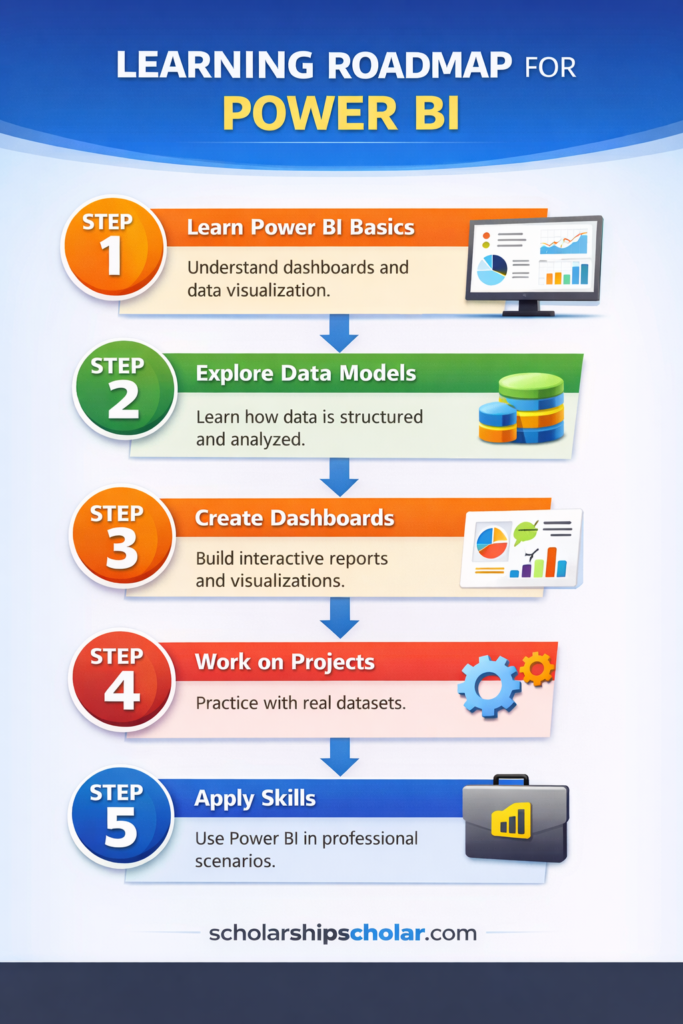
Microsoft Free Power BI Course Learning Roadmap (Step-by-Step Guide)
If you are starting from zero, follow this structured roadmap.
Step 1 – Learn Power BI Basics
Understand dashboards and data visualization.
Step 2 – Explore Data Models
Learn how data is structured and analyzed.
Step 3 – Create Dashboards
Build interactive reports and visualizations.
Step 4 – Work on Projects
Practice with real datasets.
Step 5 – Apply Skills
Use Power BI in professional scenarios.
This roadmap helps beginners progress from basic concepts to practical analytics.
Pro Tips for Learners
- Practice with real datasets
- Build dashboards regularly
- Study business analytics concepts
- Explore industry case studies
- Stay consistent with learning
How to Enroll
Follow these simple steps:
- Visit the official Microsoft learning platform
- Search for Power BI courses
- Enroll in beginner modules
- Complete lessons
- Practice with projects
Microsoft provides free learning resources for beginners.
No financial investment is required to start learning.
FAQs
Is the Microsoft Power BI course free?
Yes, Microsoft offers free learning resources for Power BI.
Do I need coding knowledge?
No, Power BI is beginner-friendly and does not require programming.
Can I get a certificate?
Yes, certification options are available after course completion.
Is Power BI useful for careers?
Yes, data analytics skills are in high demand across industries.
What industries use Power BI?
Most of finance, marketing, sales, and operations use Power BI for analytics.
Final Thoughts
The Microsoft free Power BI course provides an excellent starting point for beginners. With analytics skills, you can explore career opportunities in data-driven industries. Open your laptop today, start learning, and take the first step toward a data analytics career.